IOM steel frame example in Python
This example builds a steel frame in IOM, the IDEA Open Model, from Python. It loads IdeaRS.OpenModel.dll from the
IDEA StatiCa installed on your computer with pythonnet. Then it creates an
IDEA StatiCa Connection project from the model, with the
ideastatica-connection-api package.
It is the Python version of the C# steel frame example, with the same frame. The C# example goes further: it adds internal forces, a second connection, and plates, bolts and welds.
What it shows
- Using the IOM classes from Python.
- Building a structural model in IOM: settings, a material, cross-sections, nodes, members, load cases and load combinations.
- A connection with the members only, for the engineer to design in IDEA StatiCa Connection.
- Saving the model, and creating a Connection project from it with the Connection API.
| File | What it does |
|---|---|
steel_frame.py |
Builds the model and saves it as SteelFrame.xml. Start reading at create_iom. |
create_connection_project.py |
Creates the Connection project from SteelFrame.xml and saves it as SteelFrame.ideaCon. |
Requirements
- Windows with IDEA StatiCa 26.1 installed.
- Python 3.11 or newer.
Run it
Install the packages, best in a virtual environment:
pip install -r requirements.txtBuild the model:
python steel_frame.pyIt loads
IdeaRS.OpenModel.dllfromC:\Program Files\IDEA StatiCa\StatiCa 26.1. If IDEA StatiCa is elsewhere, give its folder as the first argument:python steel_frame.py "D:\IDEA StatiCa\StatiCa 26.1"It saves the model as
SteelFrame.xmlin the current folder and writes:The IOM is saved in C:\...\SteelFrame.xmlCreate the Connection project, in the same folder, with the same optional argument:
python create_connection_project.pyIt starts the Connection API of IDEA StatiCa and creates the project. This takes about half a minute. The Connection API writes its log to the console, and at the end the script writes:
Connections in the project: M1 - M3
The project is saved in C:\...\SteelFrame.ideaCon
Open
SteelFrame.ideaConin IDEA StatiCa Connection. Connection names the connection after its members:M1 - M3is the connection at node N2, with the members only.
IOM in Python
pythonnet makes the .NET classes of IOM look like Python classes. Load the DLL, then import the classes from their namespaces:
import clr

clr.AddReference(str(open_model_dll))

from IdeaRS.OpenModel import OpenModel, ReferenceElement
from IdeaRS.OpenModel.Geometry3D import Point3D
Some mistakes pass without an error, and the model just lacks a value. A misspelt property name is one: C# reports it,
Python does not. Three short helpers in steel_frame.py stop the script instead.
create and set_properties set the properties of an object. A plain node.x = 1 sets nothing on the
.NET object, because its property is X: Python keeps the value on its side. These helpers stop at a name the object
does not have:
add(model, create(Point3D, Id=id, Name=name, X=x, Y=y, Z=z))
All values are in SI units: metres, newtons, pascals.
add adds an object to the list of its type in the model, here model.Point3D. model.AddObject itself adds
nothing, without an error, when the model has an object of that type with the same Id. That is so in C# too.
find_by_name finds an object to refer to. An object refers to another one with a ReferenceElement, and a
reference to None saves as an empty reference:
create(CombiItem, Id=id, Coeff=1, LoadCase=ReferenceElement(find_by_name(model.LoadCase, load_case)))
A list property that the class leaves empty, such as ConnectionData.Beams, needs a .NET list:
from System.Collections.Generic import List

beams = List[BeamData]()
beams.Add(create_beam_data(beam))
beams.Add(create_beam_data(column))
The IOM API reference describes every class.
The model
create_iom builds the model, with one function for each part. The C# example explains each part in more detail; its
sections are linked below.
Settings. The design code is EN,
CountryCode.ECEN. The material must be of the same code.Material and cross-sections. The steel is S355, a
MatSteelEc2. Both cross-sections are rolled I sections, which IDEA StatiCa finds in its library by the name: HE200B for the beams and HE240B for the columns. See Material and cross-sections.Nodes and members. Nine nodes, N1 to N9, and six members, M1 to M6. A column runs through the node of the floor beam, so it has two segments and two elements. The columns set their local axes with a
CoordSystemByPoint. See Nodes and members.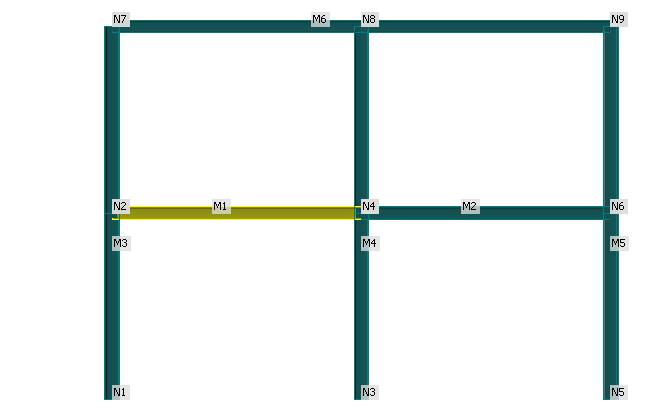
Load cases and combinations. Two load groups, three load cases, and two linear ULS combinations. See Load cases and combinations.
The connection at node N2. The floor beam M1 ends there, and the column M3 runs through. A
ConnectionPointholds the node and the members, and aConnectionDataholds the members asBeamData. See Connections.
Make it your own
- Internal forces.
steel_frame.pysaves the model in anOpenModelContainer. Set itsOpenModelResultto the internal forces your FEA application computed. The C# example shows what they hold, in Internal forces. - Plates, bolts and welds. Add them to the
ConnectionData, as the C# example does at node N2. - More connections. Add a
ConnectionPointand aConnectionDatafor each, in the same order. The Connection API creates only the first connection unless it gets the ids of the connection points:client.project.import_iom(xml, connections_to_create=[1, 2]), with the content ofSteelFrame.xmlasxml.